
Menu & ordering
A menu that sells with photos
Large photos, a banner per category and a layout that suits the dishes: a grid for sushi, a list for drinks. Guests find what they are looking for in a few taps.
GUESTIT’S ORIGINAL TABLET MENU
guests order directlyNo QR code, no app and no personal phone. The 8-inch tablet menu is ready on the table, responds instantly and shows each dish as it looks. Your guest understands without explanation what to do and orders at their own pace.
 Prototype
A complete digital guest experience without a phone, with all the focus on what the restaurant has to offer. This is proven to deliver higher throughput than QR or manual ordering, a better guest experience than a paper menu alone and a proven higher profit margin.
Log in with code 1688, choose table 1 and a package, then tap Activate. The demo is in English; nothing is actually ordered.
THE PROBLEM
in the kitchen todayWhat has run out is still on it. A new dish costs a print run. And what your guest doesn’t see in front of them, they usually don’t order.
IN USE
Dutch hospitality venuesThe tablet menu is the product Guestit started with. It runs in production, alongside POS, kitchen displays, printers, payments and reporting — not a pilot and not a beta.
POS, tablet menu, QR, kitchen displays, printers, payments and tips all run in production.
Prices, packages and availability come from a single source. The menu on the table doesn’t deviate from the POS.
Hardware, software and updates all come from Guestit itself. No loosely pieced-together parts.
TWO GUEST JOURNEYS
QR makes self-service digital.An eMenu is not a QR ordering page on your guest’s personal phone. It is the successor to the paper menu, and it belongs to the table — not to your guest’s device.
Where — on every table
Your guest — chooses, with your floor staff alongside
Your team — advice, attention and service
Presentation — identical on every table
Suits — venues where service makes the difference
If you choose an eMenu, you choose for the menu to belong to the table and for your floor staff to stay involved. That is not a different order button, it is a different guest journey.
THE FORMAT
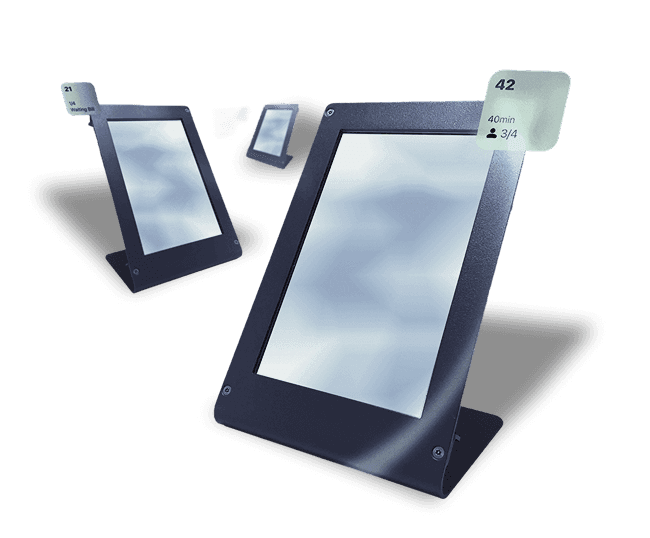
Small enough to fit on a tableA phone screen is too small to sell a dish. A ten- or twelve-inch tablet takes over the table. Eight inches is the size at which a photo is big enough to make you hungry, while leaving room for plates and glasses.
Description, allergens and choices all fit on the screen at once.
The whole table can look along without the screen having to be passed around.
Buttons are big enough to hit without aiming.
Compact and light, and it stands upright in its own stand.
THE SOFTWARE
You feel it with every tapThe Guestit tablet menu is built specifically for our own hardware and for Android. Not a website pretending to be an app, but software that runs directly on the device.
That is not a technical detail. Because we control both the software and the device, we can decide how fast a screen responds, how smoothly a long menu scrolls and how a complicated choice looks.
A tap registers without any wait. Your guest doesn’t wonder whether it worked.
Even with hundreds of dishes and photos, scrolling stays smooth.
Variants, extras, sauces and toppings are all part of the same smooth step.
Every Guestit tablet works the same way. No difference between devices or browsers.
UPDATES AND MANAGEMENT
under central controlGuestit manages not only the software, but also how it reaches the tablets. New versions go to the devices on site through our own update platform. Your staff don’t have to update any tablets, and you don’t need to know which version runs where.
Guestit development
→
Controlled update platform
→
All tablets on site
All tablets at one location run the same approved version.
Nobody has to go from tablet to tablet.
Guestit decides which version is rolled out and when.
Fixes and security updates don’t have to wait for a public app store.
Because Guestit manages both the software and the distribution of updates, we keep more control over versions, compatibility and the moment an update is rolled out.
HOW IT WORKS
is almost zeroThe tablet menu is ready on the table. Your guest browses, sees the dish and orders — or your floor staff enter it. Either way, it arrives on the same table.
When guests arrive, you link the reservation to a table.
Your guest orders via the tablet menu, or your floor staff do it — the table is always known.
Every order line goes automatically to the right prep station.
Anything added in between goes on the same bill.
One bill per table. Splitting or merging is possible.
No second place where you have to enter it all over again.
SPEED
in secondsSpeed doesn’t come from one clever feature. It comes from the steps that disappear.
The menu is already there. Your guest doesn’t have to wait for someone to come by.
What your guest chooses is recorded digitally right away. There is no second entry at the POS.
Order lines go automatically to the POS, kitchen or bar, as you have set it up.
Every handover that disappears is a moment where nothing can go wrong anymore.
Designed for as little delay as possible between the choice at the table and the moment the kitchen sees it.
PRESENTATION
what words can’tA dish you can see is easier to choose than a dish you have to imagine. On the tablet menu, every dish comes with a photo, a description and everything your guest wants to know before choosing.
Large photos instead of a line of text.
Description, allergens and dietary preferences are listed with each dish.
Your guest chooses variants, extras, sauces and toppings on their own.
Same menu, same source, different language.
Less doubt at the table means fewer questions for your floor staff.
WHAT TECHNOLOGY DOES AND DOESN’T TAKE OVER
not the personal contactAn eMenu doesn’t replace your floor staff. It replaces the part of their work that nobody misses: remembering what is sold out today, explaining what’s included in the package, checking the menu for prices that have changed, and answering the same question twenty times an evening.
What remains is the work your guests come for: advice, attention and the feeling that someone is there for them.
Every table gets the same reliable foundation. Your floor staff make the experience personal.
WHAT IT BRINGS
More attention for the guestThat difference doesn’t come from a single feature. It comes from four things that are right at every table by themselves.
Your guest sees the dish in front of them. That means less explaining and less doubt.
What’s sold out is no longer on the menu. You add a new dish yourself, with no printing.
The menu is ready on the table. Your guest doesn’t have to install or scan anything.
The same menu in several languages, from the same source.
Together, that leaves your floor staff time for the conversation at the table — the part your guest remembers.
UPSELLING
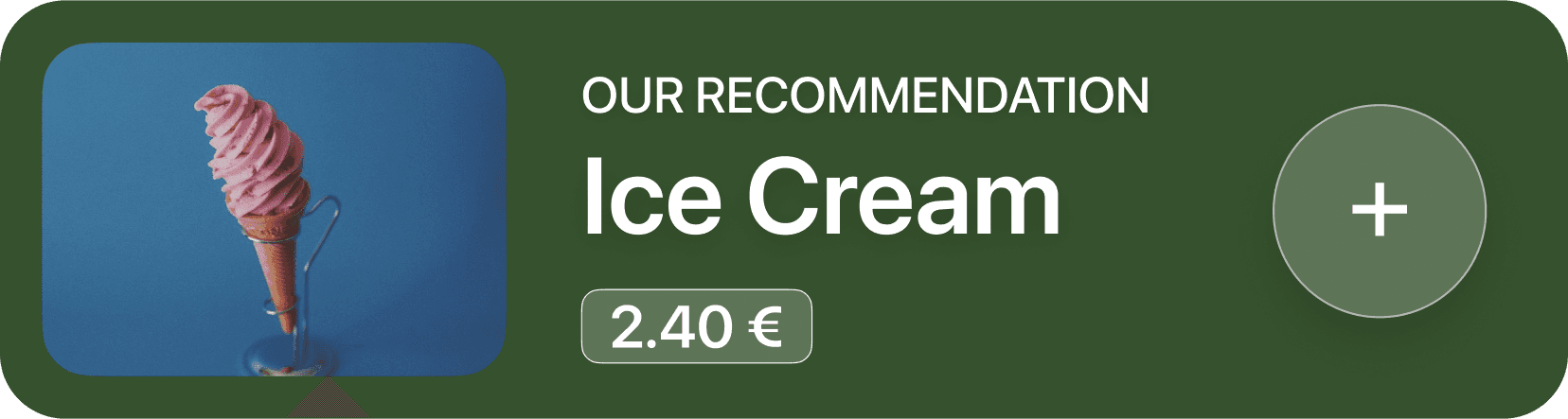
they make senseAn aperitif before the order is placed. A sauce with the fries. A dessert after the main course. Your floor staff know all of that — but on a busy evening it doesn’t always happen. The tablet menu shows it every time.
A matching wine, an extra topping or a larger portion at the moment your guest chooses.
Aperitif at the start, dessert after the main course, digestif afterwards.
Screen savers with a rotating promotion, daily special or happy hour.
Not pushy selling, but a suggestion at the moment it makes sense to your guest. And the same at every table, even when it’s busy.
PRODUCTS AND PACKAGES
the same rules everywhereEvery product exists once in your database. The tablet menu shows the same price, the same package and the same availability as the POS.
Within an all-you-can-eat package, a dish has no separate price. À la carte it does. The tablet menu follows the same rules.
Is something sold out? You switch it off once and it disappears from the table.
PAYMENT
Paying at the tableYour guest pays on the tablet menu or with your floor staff, without separate devices alongside.
CCV, PAY. or MultiSafepay, on your own contract.
Including iDEAL and QR Pay.
Tap on Glass or on the tablet menu itself.
Tips are recorded separately.
USE CASES
makes the differenceNot every venue has the same problem. These are the situations where a fixed menu on the table solves the most.
Rounds, quantities per guest and what is and isn’t included in the package are set in the system. Your floor staff don’t have to keep track of what the third round was.
Many small dishes, many rounds. Ordering without having to look for someone each time keeps the pace up.
A table orders together. One screen everyone can see works better than six phones.
A picture with every dish saves explaining, even to the youngest at the table.
Guests from different countries choose their own language.
The distance to the bar is the problem, not your floor staff. Ordering from the table removes that distance.
Every line goes to the kitchen, bar or grill where it belongs.
Guests stay where they are. Ordering comes to them rather than the other way around.
ONE SYSTEM
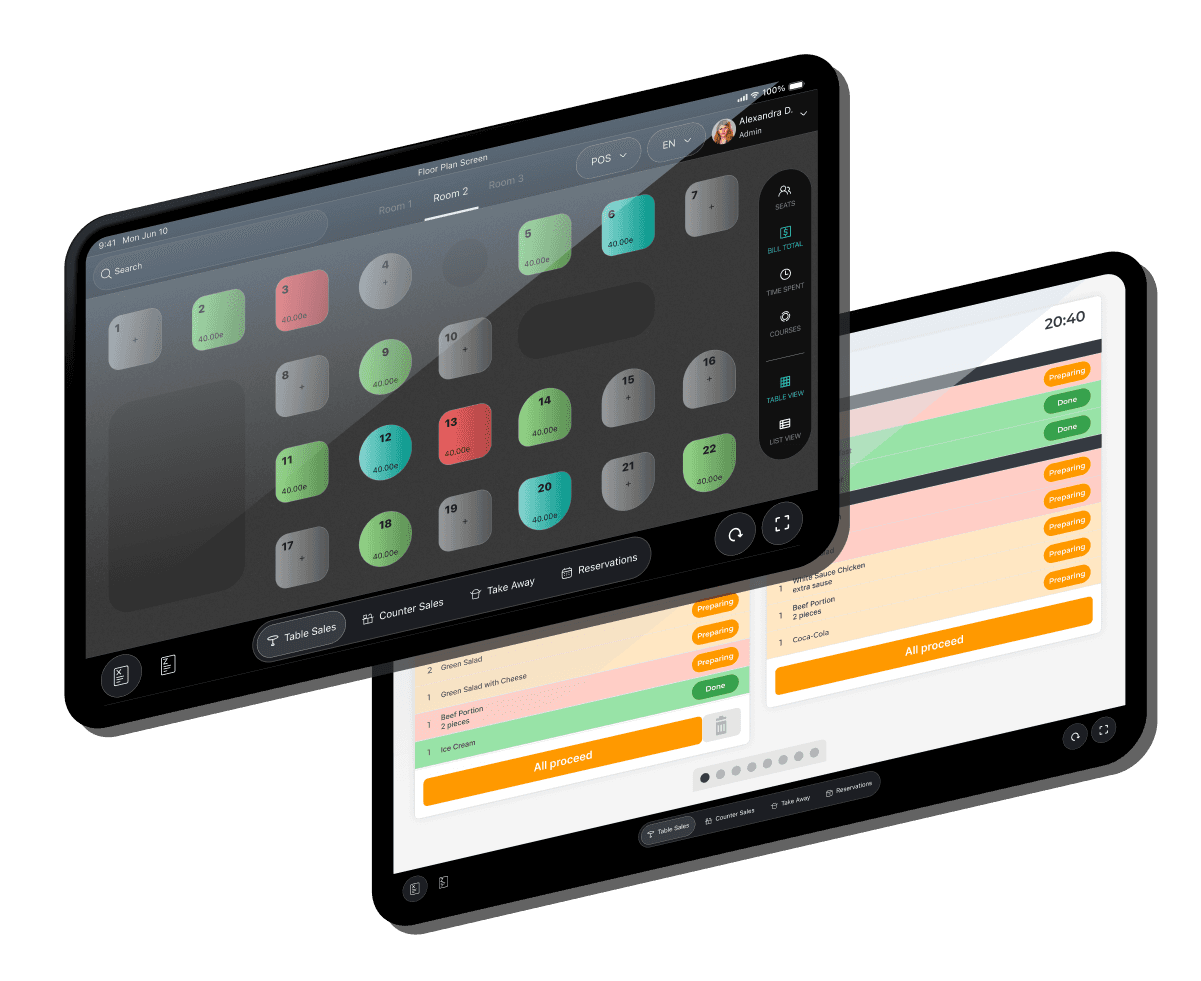
at the tabletWhat your guest chooses at the table is the start. The same order goes to the POS, to the kitchen or the bar, and comes back in your numbers. Not because there are integrations in between, but because it is one system.
Tablet menu
→
Guestit
→
POS
→
Kitchen and bar
→
Reporting
Prices, packages and availability apply to every channel at once.
Everything comes together on the same bill. You can split it or merge tables.
What was sold appears in the same reporting as the rest of your revenue.
ALL FEATURES
eMenu does.Everything the Guestit tablet menu does at the table, from the first look at the menu to paying and giving feedback.
Large photos, a banner per category and a layout that suits the dishes: a grid for sushi, a list for drinks. Guests find what they are looking for in a few taps.
Required choices, glass or bottle and extras with their price are on the product page. Add stays disabled until a required choice is made, so the kitchen never receives a half order.
A step-by-step builder for base, protein, toppings and sauce, with a price that follows the guest’s choices.
A fitting drink or side dish on the product page and in the basket. One tap to add, nothing to decline, and never added or ticked automatically.
Time-limited promotions, a voucher code at checkout and a wheel of fortune after ordering. The screens are ready; the backend decides prices, valid vouchers and where the wheel stops.
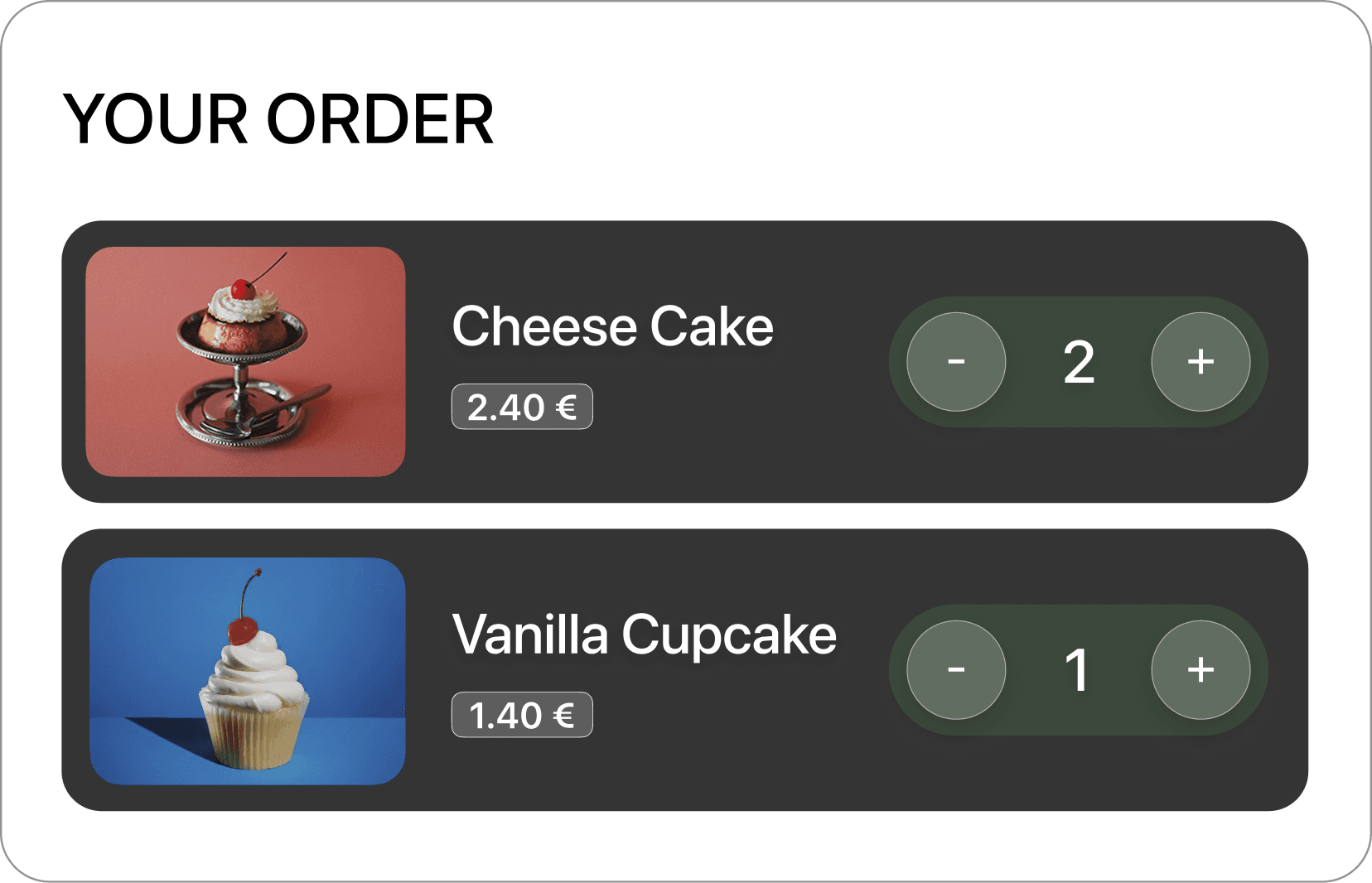
Adjust quantities, add a remark to a dish such as “no onion”, and undo a removal within five seconds. Totals always show the euro sign.
An order only counts once the POS confirms it. If the wifi drops, it waits and goes through once as soon as the connection is back, and the guest always sees where things stand.
Find a dish by name with one tap, and see everything the table has ordered so far, round by round.
Staff start the table with a package and the number of guests. Dishes in the package show as Included, extras keep their price.
The tablet shows the current round, a countdown to the next one and a clear last-round message: “You can still order dishes until 21:30.”
The maximum number per round and per person is checked in the basket, before the order goes out, with a message that says what needs to change.
When choosing the package, staff adjust rounds, waiting time and limits within what their role allows. Anything beyond that asks for a manager’s PIN code, right on the screen.
Guests see the bill live, line by line, and can ask for a correction before paying, so there are no surprises at the end.
One tap lets staff know how the table wants to pay. The tablet shows that someone is on their way.
A QR code on the tablet opens the payment on the guest’s phone. The tablet follows the payment and only shows Paid when the payment provider confirms it.
Clear percentages or a custom amount, with the new total visible before the guest confirms.
Staff split by dishes, into equal parts or with a fixed amount, even half a bottle. Every part adds up to the cent, and a paid part is locked.
After paying, a QR code gives the guest the receipt on their phone. No paper needed, and the tablet resets for the next table.
Guests ask for staff, water or cutlery from the tablet, and see that the request has been received.
Smiley ratings and two open questions after paying, as an invitation rather than a pop-up. Closes by itself after a minute so the tablet is always ready.
Each guest orders under their own name, such as “Alex D — T12”. When the kitchen reports it ready, the tablet says “Alex, your order is ready” and where to pick it up.
Press and hold the logo and enter your PIN code. Each role only sees what it is allowed to, and the tablet locks again after two minutes without use.
Choose the table, the number of guests and à la carte or a package. Linking the tablet to a table is one short step during setup.
Staff review the bill and correct a line on the spot, so the guest does not have to wait at the POS.
As soon as the POS reports the table as paid, the tablet clears itself and shows a cleaning screen. Staff can also reset it by hand.
Table service, leisure with start via PIN code or NFC, and a kiosk start screen. Choose per tablet what suits the venue.
When nobody touches the tablet, it shows your promotions. One tap and the guest is back in the menu.
Wifi and battery are always visible. If the connection drops, the tablet says what still works and what waits until it is back.
Dishes, photos, prices, availability and packages come from the Guestit CMS and the POS, so a change reaches every tablet without touching it.
Designed at 800 × 1280 for guests of every age: touch targets of at least 44 px, readable text, the main action always in the same place and no pop-ups in the way.
FREQUENTLY ASKED QUESTIONS
ask usA fixed screen on the table where your guest sees the menu and orders themselves. At Guestit, that is our own 8-inch tablet in a table stand, with your venue’s menu on it. Your guest doesn’t have to install anything, scan anything or reach for their own phone.
Your guest opens a category, looks at a dish with its photo and description, picks any variants or extras and adds it to the order. When they are done, they confirm. The order arrives on the table they are sitting at, and every line goes to the prep station where it belongs. Your floor staff can add orders to the same table; everything goes on the same bill.
With QR ordering, your guest uses their own phone and opens the menu through a code. That needs no hardware on the table and can be added flexibly, for example on a terrace. With a tablet menu, the screen is already there: larger, with a picture for every dish, and everyone at the table sees the same thing. Guestit offers both — but not at the same time on the same table. For each table, you choose one.
Because it is the size at which a dish appears large enough to make you hungry, without the screen taking over the table. On a phone, a product photo is too small to sell; a ten- or twelve-inch tablet gets in the way between the plates.
It means the app is built specifically for our own tablet and for Android, and is not a website running in a browser window. Because we control both the software and the device, we can decide how fast screens respond and how smoothly a long menu keeps scrolling.
Through Guestit’s update platform. We decide which approved version is rolled out and when it goes to the tablets on site. Your staff don’t have to update any tablets, and all tablets at one location run the same version.
Yes. Every order line is sent automatically to the right prep station, so a team member only sees what they have to do themselves. If you work with several kitchens, a separate grill or a bar, every line goes to the screen it belongs to.
Yes. A product can behave differently per package: without a separate price within an all-you-can-eat package, with a price à la carte. Those rules are set in the system, so you don’t have to create the same dish twice and your floor staff don’t have to remember what’s included in the package.
In one place. Every product exists once in the central product database, with its prices, packages and availability. What you change there applies to the tablet menu and to the other channels at the same time. If something is sold out, you switch it off once and it disappears from the table.
menu can feelA good tablet menu doesn’t need explaining. It’s ready on the table, responds instantly and helps your guest choose without effort. Leave your number and we’ll show you how that works on a real table.
We always call within 24 hours — evenings and weekends included.
We only use your number to get in touch with you. See our privacy policy.

The operating system for hospitality. Connects every step of the guest journey with the processes behind it.
© 2026 Guestit
Privacy · Terms