Guestit
English
ContactLog inIntroduction

QR ORDERING FOR HOSPITALITY

QR ordering for hospitality, directly connected to your operation

Your guest scans the code on the table, then orders and pays on their own phone. Every order arrives on the same table, the same POS and the same kitchen as the rest of your venue — no app, no retyping, no separate ordering system alongside.

Book an introduction
See how it works
All 12 features

No app needed

Directly connected to your operation

Order and pay

Personal service stays

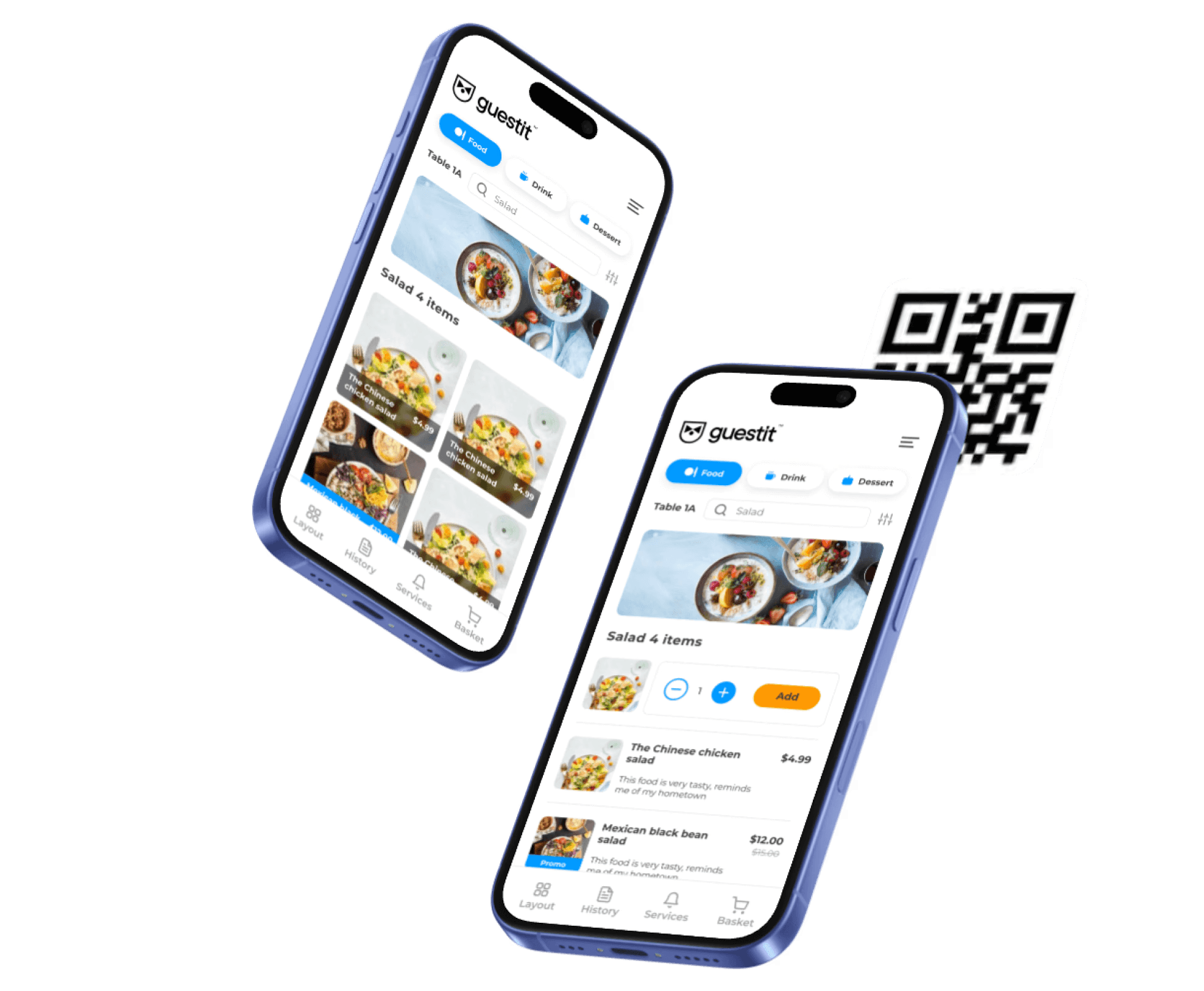
QR ordering in hospitality: the Guestit menu on a guest’s phone, linked to table 1A

THE PROBLEM

Don’t make guests wait to be able to order

In your busiest moments, time is lost on the act of ordering itself. Your guest wants a second round, but your floor staff are on the other side of the terrace. By the time someone comes by, the moment has passed.

The friction shows up in the same places: a terrace that fills up unexpectedly, an order passed on verbally that arrives differently, add-on orders that never get placed because nobody asks. QR solves that by putting part of the ordering process in your guest’s hands. That is a real solution. It is also a choice about who takes the order in your venue.

THE CHOICE

Don’t buy functionality. Design the guest journey first.

Many owners add QR because it costs little. In the market, rates run from about €135 to €200 per month — not an amount you’d spend long discussing.

But an extra feature is not an operating strategy. The question is not whether QR is worth €200 per month. The question is whether self-service fits the restaurant you want to be.

The price of software is on the invoice. The price of the wrong guest journey is in your operation every day.

HOW IT WORKS

Ordering with a QR code at the table, in four steps

Your guest scans the code that belongs to their table and sees your menu right away. What they order arrives on that same table, alongside what your floor staff ring up.

1

Scan. Your guest scans the code that belongs to their table, room or seat. That way you always know where an order comes from.

2

Choose. The right menu opens in the browser. No app, no account, no installation.

3

Order. Your guest picks products, quantities and options at their own pace, even when it’s busy.

4

Finish. The order is paid or booked to the table and goes automatically to the right bar, kitchen or prep station.

No second place where someone has to enter it again.

TRY IT YOURSELF

This is how your guest orders with a QR code at the table

This is an interactive prototype of the ordering screen your guest sees after scanning the code. Choose, adjust and order the way your guest does.

It is a prototype, not a live order. The menu for your own venue comes from the same product database as your POS.

The ordering screen on a phone with popular dishes and a combo dealPrototype

Ordering with a QR code

The ordering screen your guest sees after scanning the code. Choose, adjust and order. It's a prototype, not a live order.

You can't actually order anything here.

PAYMENT

Order and pay via the QR code, at the table

Payment can happen right when ordering or later in the evening. Nobody needs to come by with a device — and if your guest would rather have that, it’s no problem.

Your own provider

CCV, PAY. or MultiSafepay, on your own contract.

Payment methods

Including iDEAL and QR Pay.

On the phone

The guest settles up themselves, or leaves the bill on the table.

Everything comes together on one table bill. Splitting is possible, and so is merging tables. Tips are recorded separately.

WHAT IT BRINGS

More ordering capacity, without more rush behind the scenes

QR ordering takes the waiting out of the ordering moment, precisely in the places and at the moments where nobody can come by quickly.

Less waiting at the table

Your guest orders the moment they’re ready, even when it’s full.

Less running around

Your floor staff don’t need to stop by for every round. Orders come in while your team is busy.

More add-on orders

A second drink, a sauce, a dessert: ordering again takes your guest two taps instead of a gesture and some patience.

Fewer ordering errors

Your guest picks product, quantity and options themselves. There is no verbal handover left between order and kitchen.

The time this frees up goes to welcoming, advising and serving — the work your guests come for.

THE DIFFERENCE

One system, not one more channel

At Guestit, QR ordering is not a separate product. It is a sales channel of the same system your POS, kitchen and reporting already run on. What that means in practice:

One product, up to date everywhere

You create a dish once. POS, tablet menu, self-order kiosk and the QR menu all work from the same product database.

Orders in the right place

Drinks go to the bar, dishes to the right prep station. That happens based on the order line, not on who passes it on.

Your rules still apply

Packages, price profiles and availability work in the QR channel exactly as they do at the POS.

One set of records

QR orders follow the same table bill, the same payment flow and the same reporting.

One view of the evening

What comes in through the QR code and what your floor staff ring up appear in the same overview.

TWO GUEST JOURNEYS

QR makes self-service digital. eMenu makes the standard guest journey digital.

An eMenu is not a QR ordering page on your guest’s personal phone. It is the successor to the paper menu, and it belongs to the table — not to your guest’s device.

QR ordering

Where — on your guest’s phone

Your guest — serves themselves

Your team — available on request

Presentation — depends on the device

Suits — self-service hospitality

Every table gets the same reliable foundation. Your floor staff make the experience personal.

SALES MOMENTS

Turn an ordering moment into a fitting sales moment

A guest who chooses on their own looks at your menu for longer than when the floor staff are standing there waiting. That is the moment to show something.

On the product itself

A sauce with the fries or a larger size, with the price difference shown. Right where your guest is already choosing.

At the right moment

A menu that changes after a certain time: bar snacks from five o’clock, desserts only once the main course is in.

What you want to move

A promo label on the dish that has to go tonight. You decide which product that is, not an algorithm.

Within your own rules

What your guest gets to see depends on the profile, the package and the time window you set. Guestit doesn’t guess on your behalf.

HONEST ABOUT THE LIMIT

If everything is optional, nothing is standardized

Most venues offer QR as an extra option. Your guest may scan, but doesn’t have to. As a result, two guest journeys run side by side: ordering through the floor staff, and ordering through the code.

You then rarely capture the full gain of self-service, because your team still has to be available for everyone who doesn’t scan. You have added a service channel, not a standardized operating model.

QR adds a digital ordering route. It does not automatically structure the entire guest journey.

That is no reason not to do it. It is a reason to decide beforehand what you want from it: one more channel, or a different way of working.

One choice per table

At a single table you choose between QR ordering and the tablet menu — not both. Which of the two fits depends on how much you rely on presentation and attention.

WHERE IT WORKS

QR ordering where and when it adds value

Not every venue benefits equally. These are the places where the difference shows up fastest.

Terrace

The farthest tables order as quickly as those by the door, without putting extra people on.

Restaurant

Add-on orders and drinks keep coming in while your team is serving the food.

Café and bar

No queue at the tap at the busiest moment of the evening.

Beach pavilion

Guests order from their spot instead of from the bar.

Hotel room

Room service without a phone call, with the right room attached to the order.

Bowling and entertainment

Order from the lane, without interrupting the game.

Food hall

Every order goes to the right pickup point, even with several kitchens.

Event and holiday park

Temporary points of sale with their own code, without a separate POS setup.

MANAGEMENT

Change your menu once, not again in every sales channel

What your guest sees on their phone is the same menu as at the POS. Prices, packages and what has run out carry over, without you keeping track of it anywhere separately.

Within an all-you-can-eat package, a dish has no separate price. À la carte it does. The QR menu follows the same rules.

From one place you manage products and descriptions, prices and price profiles, packages, temporary availability, time-based offers, which channels show a product, and the codes per table or location.

FROM SCAN TO KITCHEN

From scan to kitchen without manual steps in between

An order through the QR code follows the same route as an order your floor staff ring up. There is no export step and no second entry in between.

Guest scans → menu opens → order placed → table bill or payment → automatic routing → preparation → pickup or serving → reporting

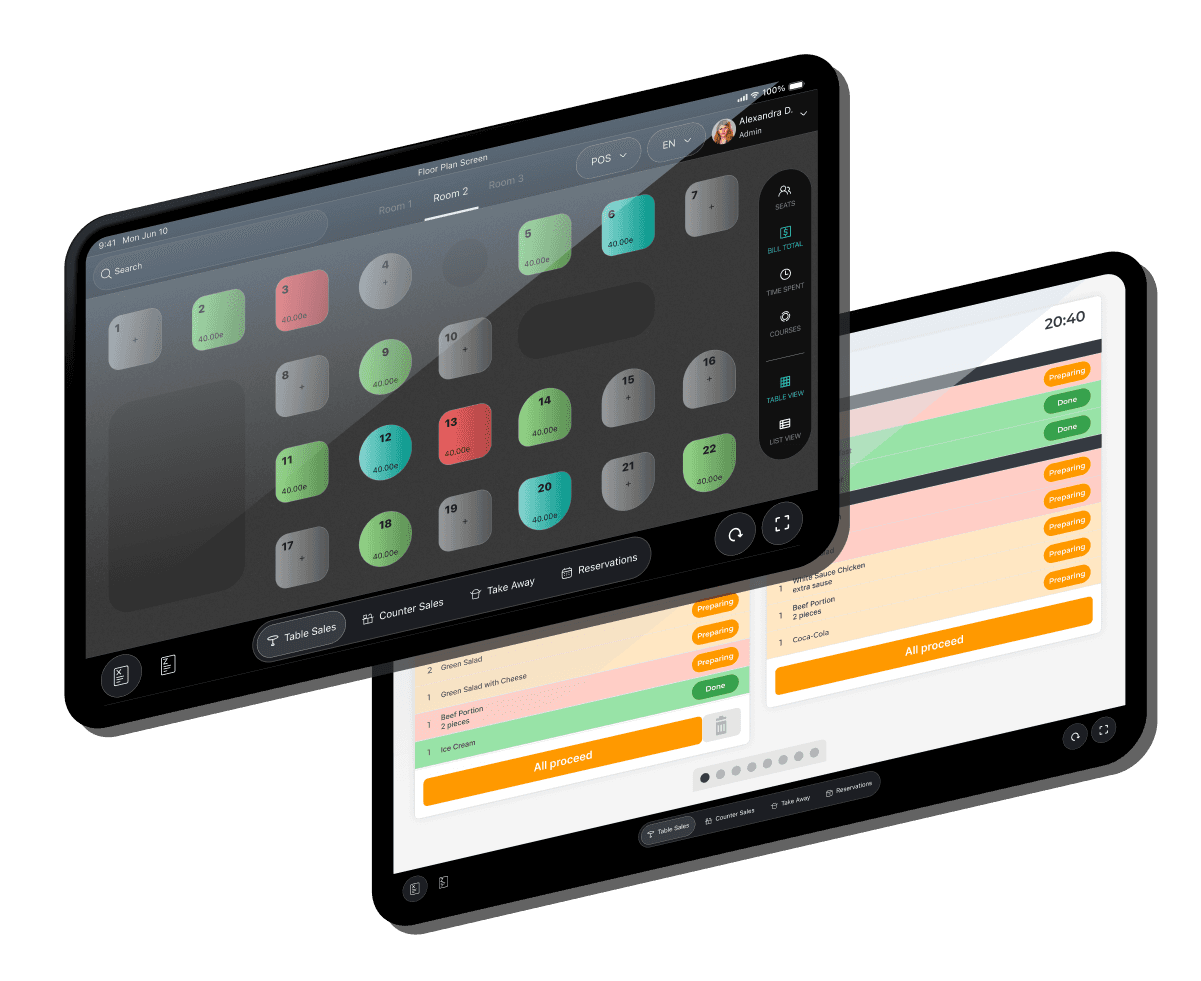
What comes in through the QR code appears on the same ticket as what your floor staff ring up in the Guestit POS system, and goes automatically to the kitchen displays and prep stations. Prefer a well-presented menu on the table? Take a look at the tablet menu at the table. Ordering at the entrance or the pickup point goes through the self-order kiosk. You can read what it delivers in insights and reporting, and what it costs on costs and benefits.

A QR order in the Guestit POS system and on the kitchen display, showing table layout and preparation status

ALL FEATURES

Everything QR ordering does.

Your guest takes out their own phone, scans the code on the table and has your menu in front of them. No download, no account, no explanation. You keep your hands free for the work that really matters.

12 features
Ways to order

QR Table Mode

A code on the table. That’s all there is to it.

The guest scans, orders and pays right away. The order is tied to that table, so you always know where it has to go — even when four people are sitting there who each want something different.

  • Pay right away, or put everything on the table bill
  • As many rounds as the guest wants, in a single visit
  • Everyone orders on their own phone
  • Works on any phone with a camera
Ways to order

Pickup and counter

The same menu, a different pickup time.

Ordering at the counter or ahead of time from the sofa. The guest tracks their order until it’s ready for pickup.

  • Pickup point can be set per location
  • A message when the order is ready
What you get out of it

Upselling that doesn’t nag

The right suggestion, at the right moment, once.

A meal upgrade with the dish, extras while building it, a suggestion in the basket. What’s already been ordered isn’t offered again — and a suggestion that’s been dismissed doesn’t come back.

  • “Make it a meal”, with the contents shown right there
  • Extras per dish, with the added price visible up front
  • A drink on the side, matched to the dish
  • Suggestions in the basket, right before paying
  • Each suggestion on or off, in the order you choose
What you get out of it

Product details that sell

Everything a staff member would tell the guest, without anyone having to come over.

A full-size photo, the description, the ingredients, a note from the chef. And all the choices that go with the dish, on one screen.

  • Sizes as a required first choice — no wrong orders
  • Colour-coded choices: green for extras, red for without
  • Labels on the photo: popular, spicy, new, vegetarian
  • Promotional price with the old price crossed out
  • A note on a dish or on the whole order
What you get out of it

Allergens

The guest turns on what they watch out for and sees it on every dish.

No more conversation at every table. We don’t block anything — that stays your kitchen’s judgment — but nobody needs to ask any longer, and your own text about allergens is always shown with the dish.

What you get out of it

The guest tracks their order

Spares your floor staff the “how much longer?” question.

From the moment of ordering, the guest sees where their order stands: received, in preparation, ready. With an estimated time if the kitchen can give one, and otherwise none — never a guess that gets held against you later.

  • Tracked per round, even if the guest orders three times
  • Drinks can be ready while the kitchen is still working
  • A message by SMS or email, if the guest wants it
  • The bill afterwards, via a link that keeps working
What you get out of it

Payment the way you want it

Pay up front, or put everything on the table bill.

You decide per location what is possible. A payment can never go through twice: if the connection drops, the system finds out what happened instead of trying again.

What you get out of it

Service at the table, with one tap

Call the floor staff or ask for the bill, without waving anyone down.

The way you want it

Your branding

Colours, logo, typography. It’s your business, not ours.

The guest sees your restaurant, not an ordering system with your logo pasted into it.

The way you want it

Three languages, as standard

Dutch, English and German, out of the box.

The guest’s language choice is passed on to the kitchen, so your floor staff know who to address in German.

The way you want it

One place for your menu

Change a price, turn off a dish, start a promotion.

You change it once and it’s on every table. Even in the middle of service.

The way you want it

Straight into the kitchen

Orders arrive on the KDS and in the POS.

Nobody retypes anything, so nobody retypes anything wrong. One menu, one set of sales figures, one set of records.

FREQUENTLY ASKED QUESTIONS

Frequently asked questions about QR ordering in hospitality

What is QR ordering in hospitality and how does it work?

Your guest scans a code that belongs to one table or spot and opens your menu on their own phone. They choose products, quantities and options, place the order and pay, or leave the bill on the table. No app is involved. At Guestit, that order arrives in the same system as your POS.

Does my guest have to download an app?

No. The menu opens in the browser that is already on their phone. No app, no account and no installation needed. That removes exactly the hurdle where most orders fall apart: a guest who can’t be bothered to install something for a single drink.

Can guests pay via the QR code?

Yes. Your guest can pay right when ordering or later in the evening. Payment runs through your own provider — CCV, PAY. or MultiSafepay — with methods such as iDEAL and QR Pay. If your guest would rather pay your floor staff, the bill simply stays on the table.

Can QR ordering be connected to my POS and kitchen?

It isn’t a connection, it is the same system. QR ordering is a sales channel of Guestit. Every order line goes automatically to the right prep station: drinks to the bar, dishes to the kitchen, based on the product itself. What comes in through the code appears on the same table bill and in the same reporting as what your floor staff ring up.

Does every table get its own QR code?

Yes, and that is the intention. Each code belongs to one table, room or seat. That way the system knows which bill an order belongs to, and your floor staff don’t have to work out who ordered what.

Can I manage my menu and prices centrally?

Yes. You create a product once in the central product database. POS, tablet menu, self-order kiosk and the QR menu all work with the same data. If you change a price or mark something as sold out, it is correct in every channel — you keep nothing separate for the phone.

Can QR ordering be used alongside personal service?

Yes, and for most venues that is the best setup. You decide how far to go: only showing the menu, only add-on orders, or full ordering and payment. What your guest orders through the code and what your floor staff ring up lands on the same bill.

How is QR ordering set up?

If you already work with the Guestit POS, your menu, prices and packages are already in it; the QR channel uses the same data. Then you decide which products are visible in that channel, and each table or spot gets its own code. How long that takes in your situation, we discuss in the introduction.

What does QR ordering from Guestit cost?

QR ordering is a channel within Guestit and is not sold as a separate module. You pay a monthly amount for the whole system: between €11 and €23 per table per month, depending on the size of your venue, plus a one-time setup fee of €2,150. Hardware, support and updates are included. On the Costs and returns page you can calculate it for your venue, or we can do it together in an introduction.

Decide the guest journey first, then the technology

Leave your number and we’ll call you. A conversation about how your service runs today: where the friction is, where things get done twice, and where QR ordering will — or won’t — help. No obligation.

We always call within 24 hours — evenings and weekends too.

We only use your number to get in touch with you. See our privacy policy.

The operating system for hospitality. Connects every step of the guest journey with the processes behind it.

© 2026 Guestit

Privacy · Terms